Windows DLL
Windows DLL#
DLL is a shared library that is a module that cannot be executed directly, but needs to be loaded to use the exported functions.
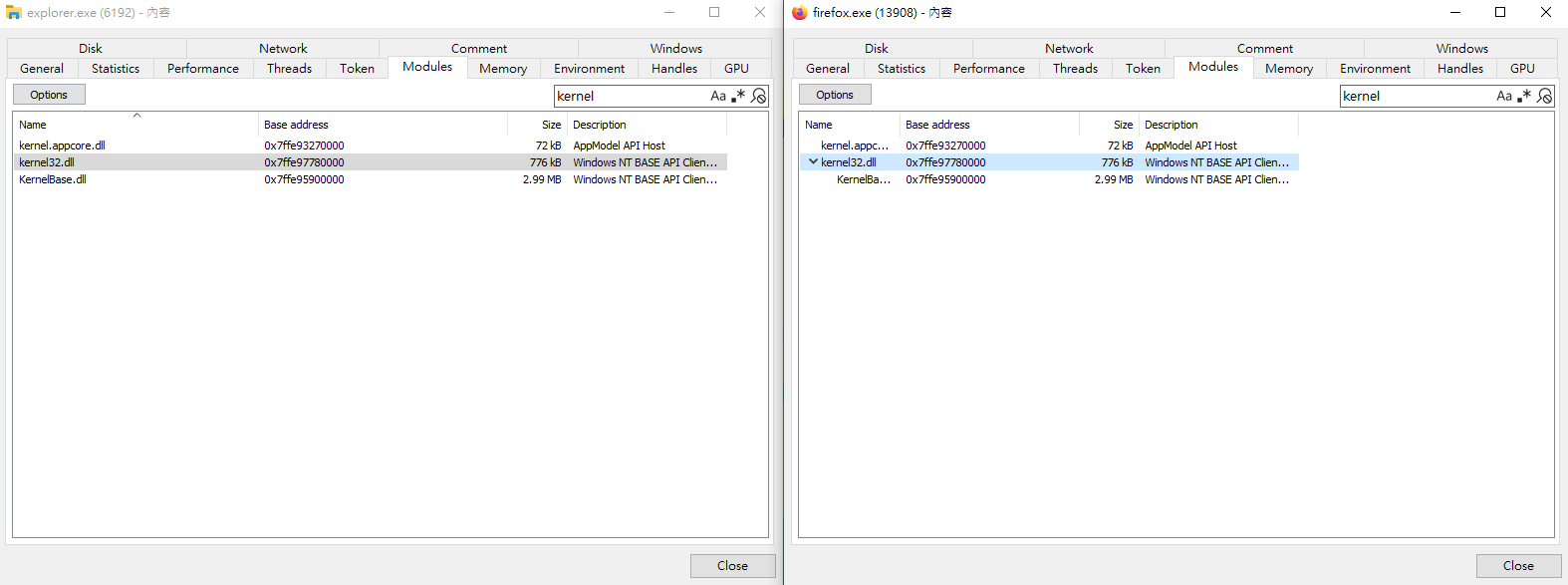
System-wide DLL Base Address#
For optimization purposes, some DLLs are loaded at the same base address in the virtual space of all processes.
DLL Entry Point#
Since DLLs are loaded by executables, they can specify an entry point function that executes code when certain actions occur.
There are 4 possibilities for the entry point being called:
DLL_PROCESS_ATTACH- a process is loading the DLLDLL_THREAD_ATTACH- a process is creating a new threadDLL_THREAD_DETACH- a thread exits normallyDLL_PROCESS_DETACH- a process unloads the DLL
Exporting a Function#
To export a function in a DLL, it must be declared by keywords extern and __declspec(dllexport)
#include <Windows.h>
extern __declspec(dllexport) void Hello() {
	MessageBoxA(NULL, "Hello", "message", MB_ICONINFORMATION);
}
the function Hello() can be called after the dll is loaded into memory
Dynamic Linking#
Functions can be imported using LoadLibrary, GetModuleHandle, and GetProcAddress.
Step 1 - Loading a DLL#
The calling of Windows functions will make the process load the required DLLs in the beginning.
Custom DLLs must be loaded manually with the functions mentioned before.
#include <windows.h>
int main() {
	HMODULE hModule = LoadLibraryA("Dll1.dll");
}
Step 2 - Retrieving a DLL’s Handle#
If the target DLL had been loaded into the memory, the handle can be retrieved via GetModuleHandleA
#include <Windows.h>
int main() {
	HMODULE hModule = GetModuleHandleA("Dll1.dll");
	// if the dll has not been loaded
	if (hModule == NULL) {
		hModule = LoadLibraryA("Dll1.dll");
	}
}
Step 3 - Retrieving a Function’s Address#
After the DLL is loaded and the handle is retrieved, the target function’s address must be located.
#include <Windows.h>
int main() {
	HMODULE hModule = GetModuleHandleA("Dll1.dll");
	if (hModule == NULL) {
		hModule = LoadLibraryA("Dll1.dll");
	}
	// pHelloWorld now stores the function's address
	PVOID pHelloWorld = GetProcessAddress(hModule, "HelloWorld");
}
Step 4 - Type-casting The Function’s Address#
The type-casting to the function pointer is required in order to conveniently invoke the function.
#include <Windows.h>
typedef void (WINAPI* HelloWorldfptr)();
int main() {
	HMODULE hModule = GetModuleHandleA("sampleDLL.dll");

    if (hModule == NULL) {
        // If the DLL is not loaded in memory, use LoadLibrary to load it
        hModule = LoadLibraryA("sampleDLL.dll");
    }

    PVOID pHelloWorld = GetProcAddress(hModule, "HelloWorld"); /// pHelloWorld stores HelloWorld's function address

    HelloWorldFunctionPointer HelloWorld = (HelloWorldFunctionPointer)pHelloWorld;

    return 0;
}
Putting it Together#
Another example for calling MessageBoxA.
The following assumes that user32.dll is not automatically loaded into the memory
typedef int (WINAPI* MessageBoxAFunctionPointer)(
	HWND    hWnd,
	LPCSTR  lpText,
	LPCSTR  lpCaption,
	UINT    uType
);

void call() {
	MessageBoxAFunctionPointer pMessageBoxA = (MessageBoxAFunctionPointer)GetProcessAddress(LoadLibraryA("user32.dll"), "MessageBoxA");
	if (pMessageBoxA != NULL) {
		pMessageBoxA(NULL, "text", "caption", MB_OK);
	}
}
Running DLLs Directly#
Another way to run the functions in a DLL is by rundll32.exe
rundll32.exe <dllname>,<target function>
The following example locks the machine via the function LockWorkStation in user32.dll
rundll32.exe user32.dll,LockWorkStation